How I Built My Website with AI: A Practical Guide to Vibe Coding
By Rick Elder | December 1, 2025
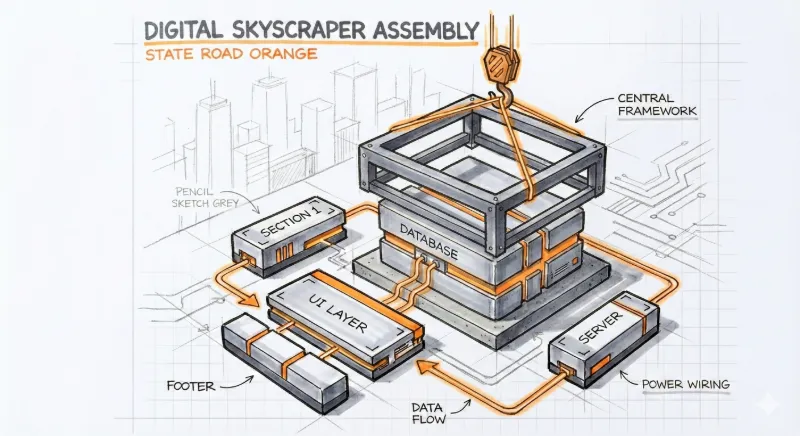
A year ago, if you told me I’d be building a custom, modular website by simply talking to my computer, I wouldn't have believed you.
I’m a process guy. I like to map out a workflow, understand the steps, and execute. But the way we build software is changing, and honestly, it’s becoming a lot more accessible for the rest of us.
There’s a new term floating around called "vibe coding." It sounds trendy, but here’s what it actually means: building software using natural language instead of complex syntax. It’s not magic; it’s just a new, very powerful utility.
This is the story of how I used standard AI tools to plan my site, and then used Google’s new Antigravity platform to build a version that is fast, practical, and actually looks like me.
Phase 1: The Rough Draft (My AI "Junior Developer")
My first attempt was simple. I needed a presence on the web, so I opened up Gemini and used its Canvas feature. Think of this like sitting next to a junior developer. I didn't have to write the raw code myself.
I would highlight a section of the page and say, "Make this headline bigger," or "Let's move this menu to the left." It worked. We got a functional site up quickly. But it was rigid.
Every time I wanted to update a link in the menu, I had to manually open every single page file to fix it. It was a classic "static" site—functional, but hard to maintain. It didn't have that "engineered" feel I was looking for.
Phase 2: Finding the Identity (The "Industrial Sketch")
I realized I didn't just want a website; I wanted a brand that felt like State Road AI. The first version felt a bit generic, like a template anyone could buy. I went back to the drawing board—literally.
I opened a session with Gemini and we acted as brand strategists. I explained that I didn't want the smooth, plastic look everyone else is using. I wanted something grounded.
We landed on an "Industrial Sketch" aesthetic. Think of a marker rendering on a drafting table—Charcoal Gray lines, technical details, and hits of Signal Orange to draw the eye.
We built a custom Gemini Gem (a saved custom assistant) to act as my on-demand artist. Now, instead of struggling with prompts, I just type "Meeting room, wide angle," and it generates an image that looks like it came straight from my sketchbook.
Phase 3: The Rebuild with Google Antigravity
With the look nailed down, it was time to fix the structure. I used Google’s Antigravity platform. This tool is interesting because it doesn't just write code; it understands your project.
I gave it a simple, practical instruction: "Read my current website, but rebuild it so it's easier to update." The AI acted like a translator. It looked at my static HTML files and suggested we move to PHP Includes.
If you're not a coder, think of PHP Includes like a "Master Slide" in PowerPoint. You save your menu in one file. When you update it there, it updates on every page of your site instantly. Practical. Efficient.
We set up a testing environment right on my computer (localhost). This allowed us to test the new design—checking that the Montserrat headings looked strong and the Inter body text was legible—before we ever pushed it live to the web.
Phase 4: The Content Engine (Simple Tools, Real Results)
I wanted to write blog posts, not manage a complex database. So, we built a simple workflow. I created another custom Gem for my writing.
I draft my ideas in plain English, and the Gem converts them into a JSON object (a specific data format the website can read). It formats the headers, the text, and the metadata automatically. I just copy, paste, and publish.
For visuals, I started using Nano Banana Pro. It helps me create infographics that explain complex AI concepts simply. Combined with our industrial sketches, the site finally felt like a cohesive, professional tool.
Phase 5: The "Helpful Neighbor" Image Optimizer
Here was the final problem: those beautiful industrial sketches were huge files. They were slowing down the site. I could have bought a fancy plugin, but I decided to build a simple tool instead.
I used Google AI Studio to create a custom image optimizer. But we made it smart. It operates like a chat. When I drop an image in, the tool asks me: "Where is this going? Is it a big Hero image or a small thumbnail?"
Based on my answer, it crunches the file down to the perfect size and converts it to WebP (a modern, fast image format). It’s like having a neighbor who knows exactly which wrench you need for the job.
The result? My site speed rating on Hostinger jumped 8 points, hitting a near-perfect 98/100.
The Bottom Line
Building this website wasn't about learning a secret coding language. It was about clarity. By knowing what I wanted—a grounded, practical, efficient site—I was able to guide the AI to build it for me.
This technology isn't just for the tech elite. It’s a tool for Main Street. And if you have a clear process, you can build something incredible too.
Ready to apply this?
Let's discuss how this strategy fits into your specific business roadmap.
Schedule a Strategy Call